Agent Workforce
Open-source Go tooling · Public v0.1.0
A CLI and coordination layer for assembling specialist coding agents behind generated MCP tools. It gives one Forge coordinator a consistent way to delegate focused work while the CLI manages setup, process lifecycles and an optional visual workspace.
Turn specialist agents into one usable team
Coding agents are useful in distinct roles such as planning, implementation and review, but coordinating several of them often means maintaining separate prompts, commands and runtime processes by hand.
Agent Workforce packages those roles into a single local workflow. The coordinator sees each specialist as an MCP tool, so delegation fits the same tool-calling model used for files, search and other development operations.
Generated tools and managed lifecycles
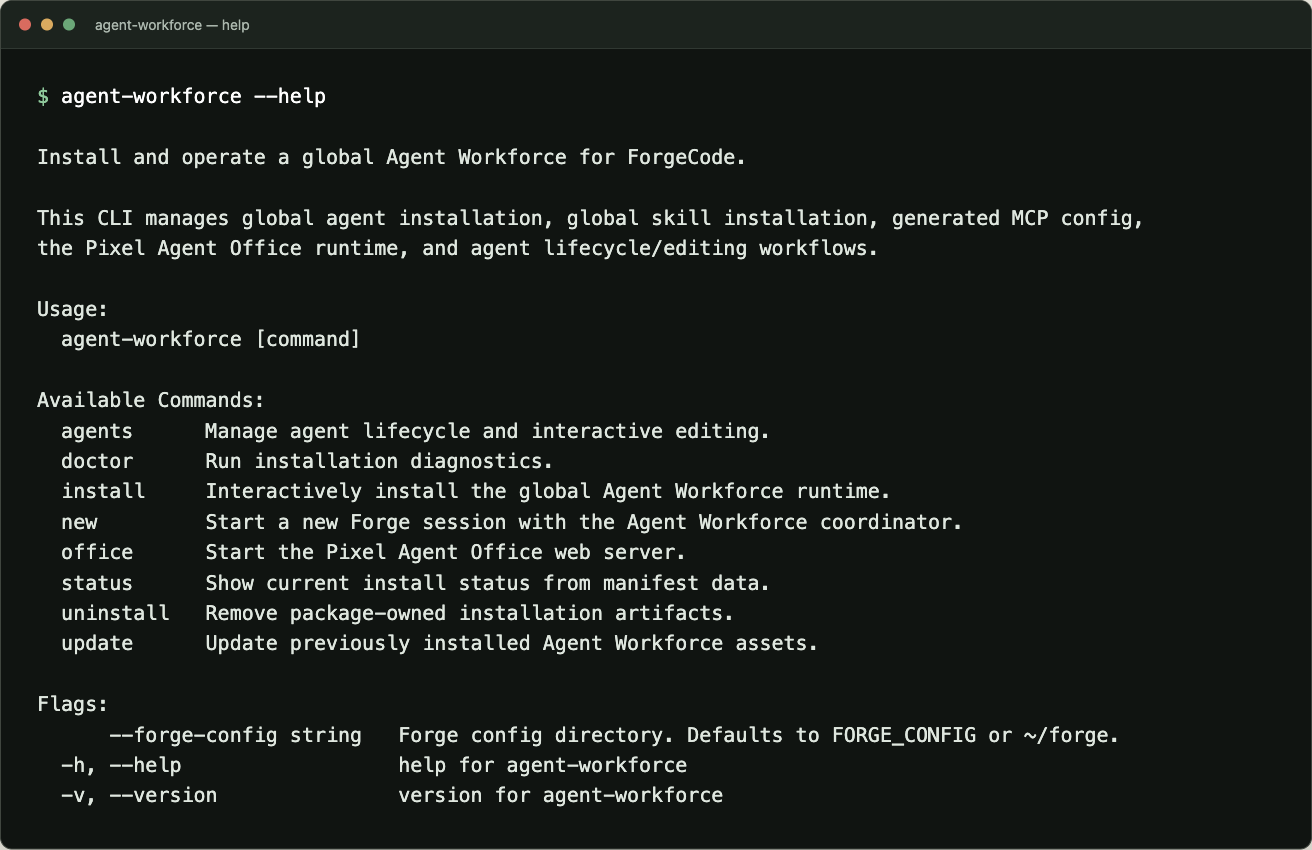
The project ships two commands. agent-workforce owns installation, lifecycle management, diagnostics, Forge session launch and the visual Office. agent-workforce-mcp is the stdio MCP server used by generated specialist integrations. Both are needed for the complete workflow.
install writes package-owned agents and skills into the selected Forge configuration, generates specialist MCP configuration under ~/.agent-workforce/mcp and records owned files in a manifest. doctor checks that setup, while new starts ForgeCode with the coordinator and forwards the remaining prompt arguments.
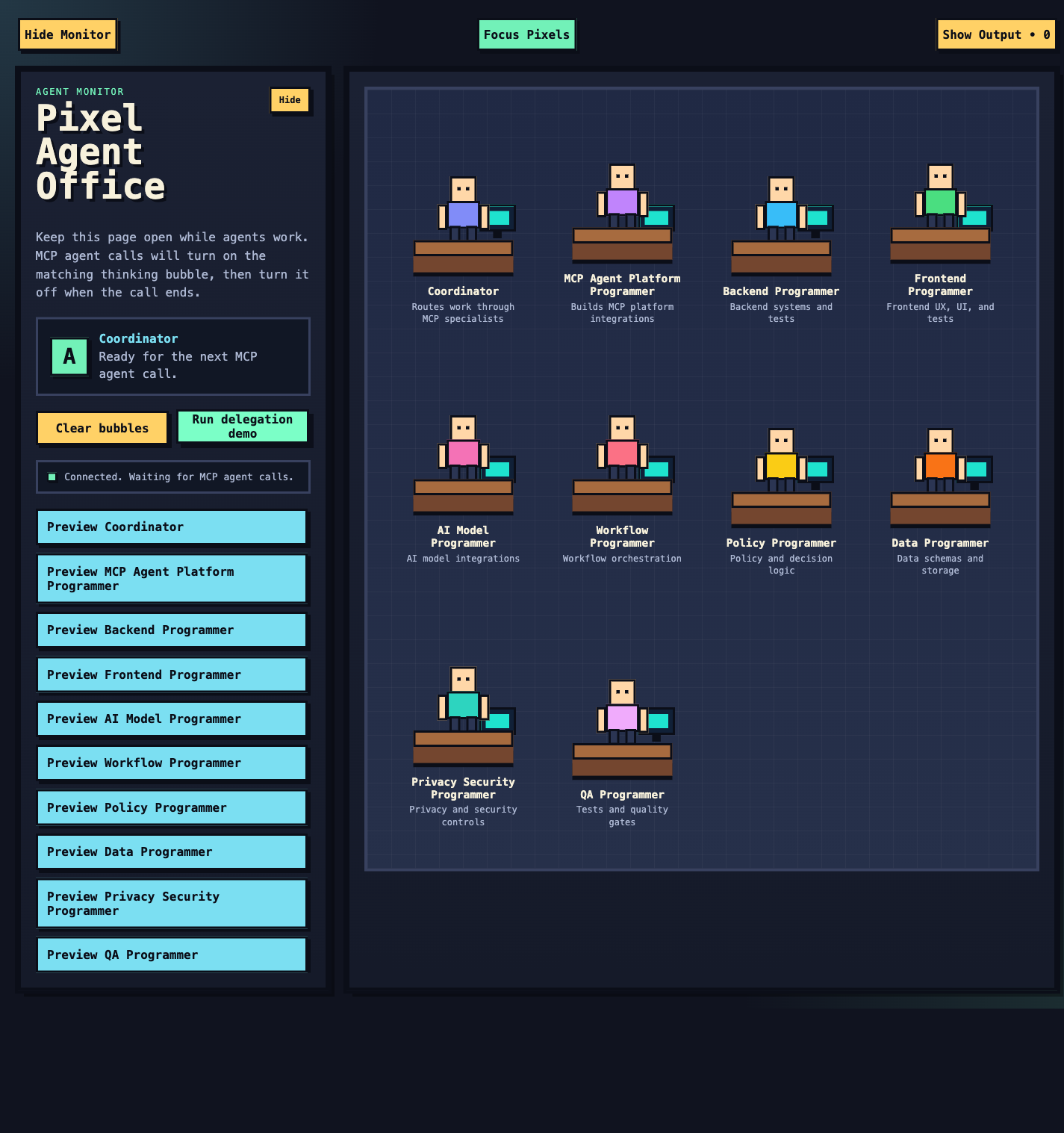
Nine specialist definitions cover backend, frontend, AI, workflow, policy, data, privacy and security, QA, and MCP platform work. They become generated MCP tools rather than ad hoc shell invocations. The coordinator chooses when to delegate and synthesizes returned work into one response.
- CLI launch
- Forge coordinator
- Generated MCP tool
- Focused specialist
- Synthesized result
One command → managed runtime → coordinator decision → specialist tool call → consolidated result.
Operate and inspect the workforce
The agents command group lists and validates installed definitions, activates or deactivates individual specialists and synchronizes custom overrides. Automation-oriented commands can emit machine-readable JSON instead of requiring callers to parse formatted terminal output.
status reads installation state from the manifest. update refreshes installed assets, and uninstall removes only the package-owned projections recorded there. User-authored custom agent source files are retained unless state removal is explicitly requested.
The Pixel Agent Office runs on 127.0.0.1:8765. It shows the coordinator, specialists, active delegation state and delegated Forge output. Because prompts and command output may be visible, the server accepts loopback and same-origin access only rather than exposing a LAN or public bind.
Trade-offs
Specialization and coordination
Giving each agent a narrow role makes responsibilities easier to understand, but the coordinator still has to select the right specialist and reconcile overlapping answers. More agents are not automatically better; each role needs a distinct purpose.
Convenience and local state
Managed installation and lifecycle handling reduce manual setup. In return, the CLI owns configuration, generated tools and process state that need to stay understandable and removable. The tracked installation manifest makes that boundary explicit.
Project scope and source
The public v0.1.0 release targets local ForgeCode workflows on macOS and Linux for amd64 and arm64. Release archives include both executables; building from source requires Go 1.25.13 or newer. It demonstrates the coordination model, generated specialist tools, diagnostics and Pixel Office integration without claiming production adoption or performance outcomes.
The implementation, release notes and setup instructions are available in the public repository.